View and Manage Active Integrations
Once your tools are connected to ReactIn, you can easily monitor and manage them from a single place.
📍 Where to find your integrations
-
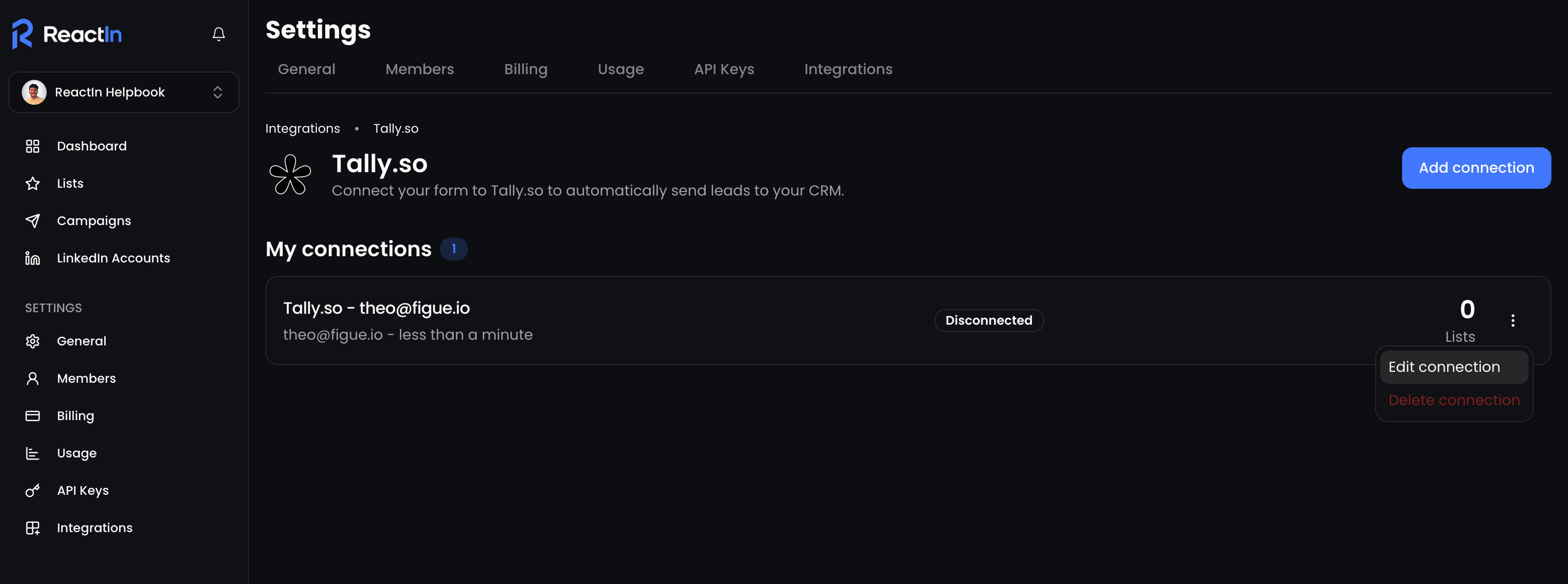
Go to Settings > Integrations
-
You’ll see a list of all connected services
-
For each integration, you can view:
-
The type of tool (e.g. Tally, Cal.com, Stripe…)
-
Its current status (connected / disconnected)
-
⚙️ Managing your integrations
For each integration in the list, click the three dots (⋮) on the right to:
-
🧩 Reconnect or refresh credentials (if expired)
-
❌ Disconnect it fully from your workspace
Changes apply instantly and won’t affect your historical data.
🧩 Native integrations are maintained directly by ReactIn, no need to update webhook URLs manually.
💡 Pro tip: Regularly check integration statuses to catch potential syncing issues early and prevent lost leads.
Ready to move on?
👉 Next Step: Link Integrations to SmartLists (the Right Way) →