Connect External Tools to Push Leads into ReactIn
ReactIn makes it easy to connect your favorite tools, like forms, booking apps, or no-code platforms, so you can send leads directly into your SmartLists without writing code.
✅ Native integrations (no code, no API)
ReactIn offers direct, built-in integrations with several platforms, no webhook or API setup required.
You can connect tools like:
-
Tally (form submissions)
-
Typeform
-
Cal.com (meeting bookings)
-
Brevo (email events)
-
Stripe (trigger based on purchases or billing)
To activate:
-
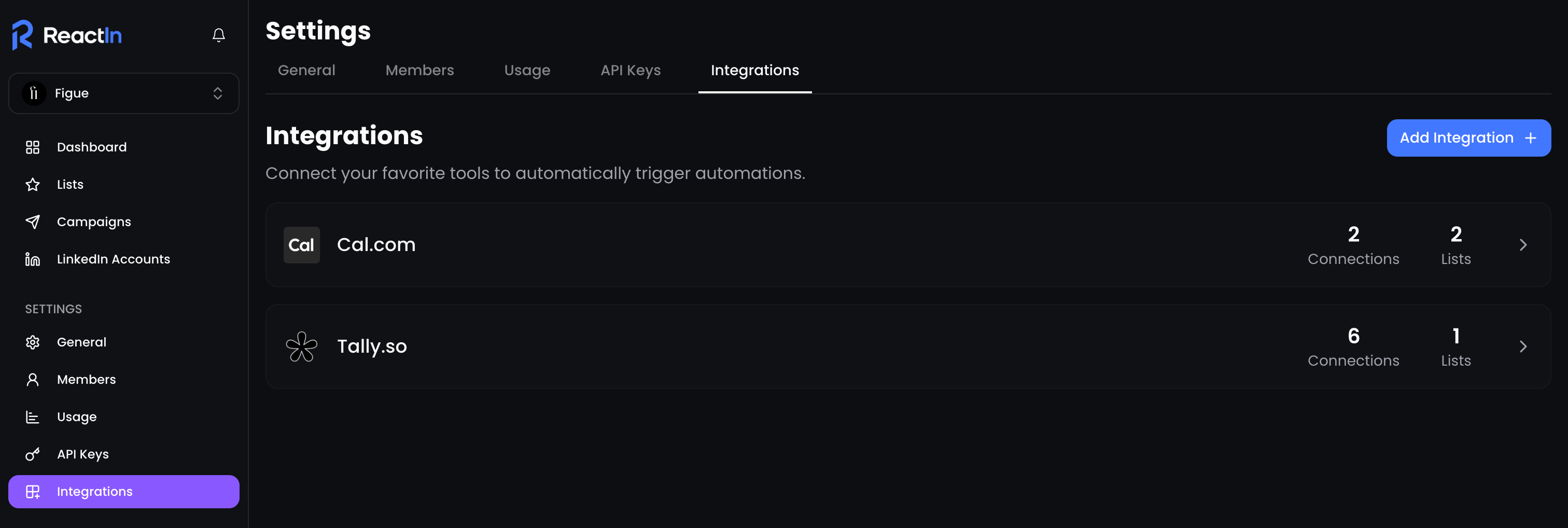
Go to Settings > Integrations
-
Find the app you want to connect
-
Authorize or paste your key (depending on the app)
-
Assign the integration to a specific SmartList
🔄 Once connected, leads will be added automatically in real time.
🔗 Other tools via webhooks (Zapier, Make, n8n…)
For tools that don’t have a native integration yet (e.g. Airtable, Notion, CRM platforms), you can still connect them using:
-
Zapier
-
Make
-
Webhooks
-
Or any backend that supports
POSTandGETrequests
These work by sending leads to a SmartList of type ReactIn API.
🧠 Popular use cases
| Tool | Use case example |
|---|---|
| Tally | Add demo request leads directly into a campaign |
| Cal.com | Trigger LinkedIn messaging post-meeting |
| Stripe | Start a reactivation sequence after failed payment |
| Brevo | Enrich leads who opened but didn’t click your emails |
| Zapier | Add leads when a CRM deal stage changes |
💡 Pro tip: Name your SmartLists after their integration sources for clearer tracking and reporting.
Ready to move on?
👉 Next Step: View and Manage Active Integrations →